
I’ve been curious about creating games using AI and wanted to build something themed around an upcoming occasion. Since Valentine’s Day has come and gone (and to be honest, I ate way too much chocolate), I set my sights on the next big holiday—St. Patrick’s Day!
Naturally, I turned to my seven-year-old daughter for ideas, and without hesitation, she proudly declared herself a Leprechaun expert. (Who knew we had a specialist in the house?) Inspired by her enthusiasm, we brainstormed a game concept featuring a mischievous Leprechaun, plenty of gold, and, of course, some sneaky obstacles.
Armed with our idea, I decided to use OpenAI’s Canvas to iteratively bring it to life.
What is OpenAI Canvas?
Think of OpenAI Canvas as an interactive sandbox for AI-driven creativity. It allows you to design and build dynamic applications, from games to interactive storytelling, while leveraging AI’s ability to iterate and refine ideas. Instead of coding from scratch or struggling through trial and error, Canvas lets you test and tweak your game elements in real-time.
Here’s what makes Canvas a powerful tool:
- Quick & Intuitive Design – You can experiment, modify, and refine elements without constantly diving into raw code.
- Effortless Fine-Tuning – Need to adjust how fast the Leprechaun runs or how often pots of gold appear? With Canvas, tweaking game mechanics is fast and easy.
- AI-Powered Assistance – Stuck on a design choice? Canvas can help brainstorm ideas, such as defining winning or losing conditions for your game.
- Faster Development – Instead of searching for syntax or getting bogged down by debugging, you can focus on bringing your game to life quickly.
The Project
With Canvas , I set out to build a St. Patrick’s Day-inspired game—a Leprechaun running around, collecting pots of gold and dodging pots of coal. My seven-year-old enthusiastically joined in as my collaborator, providing creative input on the game idea and helping test the final product.
Initial Prompt
“Create a simple game with a competitive scoring system, all contained in a single HTML file. The main character should be a Leprechaun that moves left and right to catch pots of gold. If the Leprechaun catches a rainbow, they lose the gold. Make it as interactive as possible.”
- Originally, I considered using rainbows as a penalty for Leprechauns, but my daughter strongly opposed that idea. Instead, she suggested a pot of coal as the obstacle. (A solid creative decision!)
- I also specified that everything should be in a single HTML file so I could easily embed it where needed without additional dependencies.
Below is a visual of Canvas in action. On the left, I provided my prompts, and on the right, Canvas generated and updated the code in real time.

First Iteration
The initial version of the game was pretty basic—it featured a colored block representing the Leprechaun and similar blocks for the pot of gold and the rainbow.
Bringing the Leprechaun to Life
A plain-colored block wasn’t quite the mischevious Leprechaun I envisioned. To enhance the experience, I replaced it with an actual image of a Leprechaun.
- Canvas generated a placeholder for the image, and I swapped it out with a file stored locally.
- Each time I requested a change, the code updated dynamically on the right-hand side.
- It had been over 20 years since I last worked with HTML, so having AI handle the syntax for me was amazing!

Enhancing the Visuals
To improve the game’s aesthetics, I also added images for the pot of gold and the pot of coal.
I initially specified a path a hyperlink for the images and later decided to convert the images to base64.
Base64 is a method of encoding binary data into an ASCII text format. It uses 64 characters (A–Z, a–z, 0–9, +, /) along with the = symbol for padding. I preferred having everything self-contained without having to link to another source for the images. I used this link to convert to base64: base64-image.de.
Adding a Losing Condition
Every game needs a challenge, so I needed to establish a losing condition. The easiest solution?
- If the Leprechaun catches a pot of coal, they lose points (or the game).
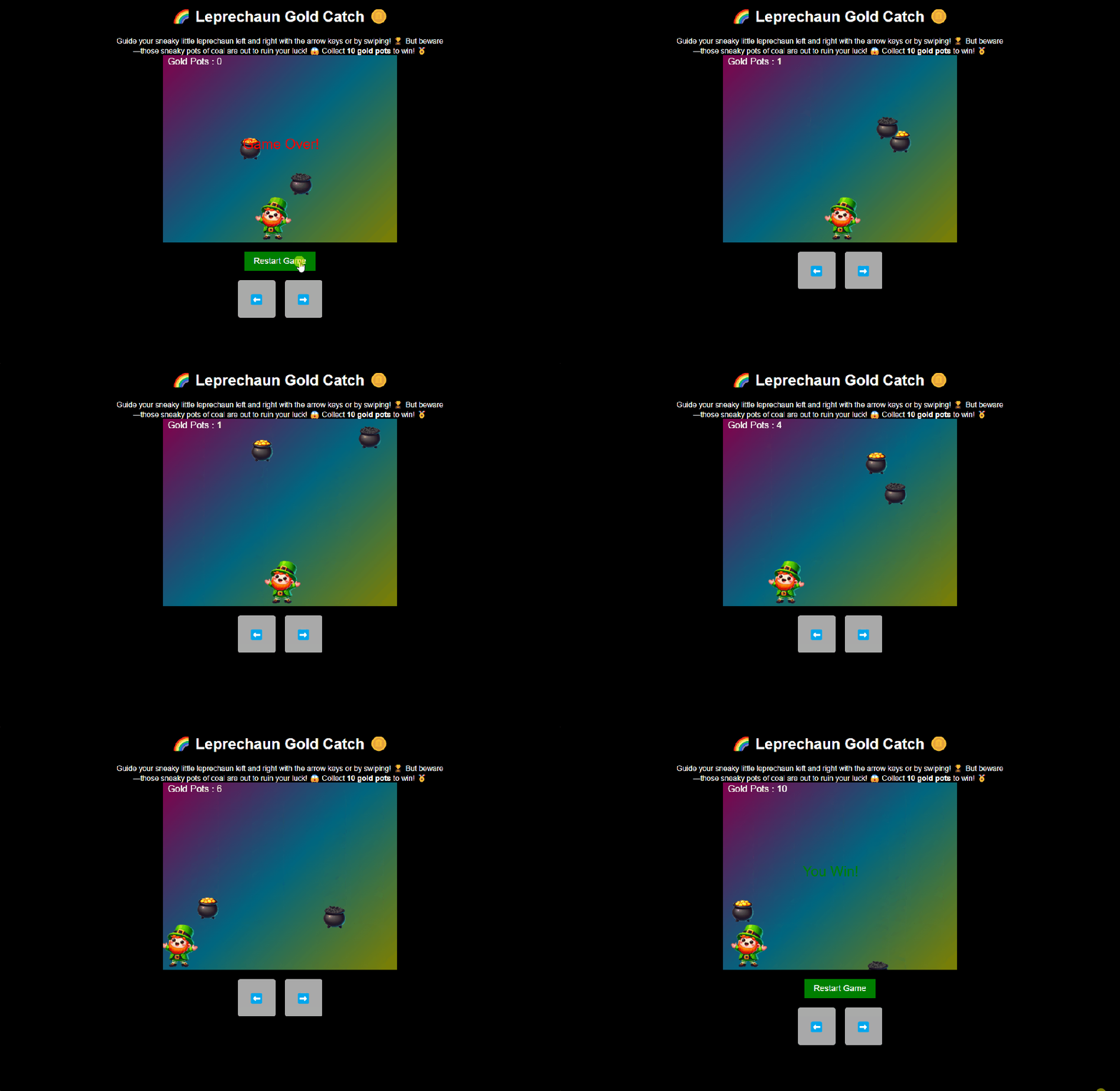
- If the Leprechaun catches a pot of coal having no pots of gold, the game is over.
Adding a Winning Condition
To keep things engaging, I needed a clear win condition—so I asked AI for ideas.
Below are two of the four ideas suggested.

I utlimately, decided that the Leprechaun would win if he collected 10 pots of gold.
The Final Game
In a very short time, we had a fully functional game—from concept to completion. I was amazed at how quickly we were able to create a game from scratch, all while learning, iterating, and having fun along the way!

Takeaway
This project was a fun dive into AI-assisted game development using OpenAI Canvas. It demonstrated how AI can speed up prototyping, simplify coding, and inspire creativity—even for those who haven’t touched HTML since the days of dial-up internet (guilty as charged). From brainstorming with my seven-year-old (whose ideas were absolute gold) to fine-tuning the game mechanics, this experience proved that when technology and imagination join forces, the possibilities are endless.
Disclaimer: The information in this blog is based on my personal experience using OpenAI Canvas. While every effort has been made to ensure accuracy, tools and platforms may update or change over time, which could impact functionality. Additionally, this game is for entertainment purposes only—I cannot guarantee it will bring you luck, but it may provide some fun!
 Bytes Of Data Insights